How to plan your workouts with Claude
Updated
Claude can write a good training plan in a chat. But the plan stays in the chat, and Claude does not see what you actually lifted. Tally connects the two. Claude puts the plan into the Tally iPhone app. You log every set at the gym. Claude reads those sets before it plans the next week.
You need an iPhone and a Claude account. The free Claude plan is enough. Setup takes about 2 minutes.
Step 1: Connect Claude to Tally
Install Tally on your iPhone and make an account. Then open the Tally Workout listing in Claude's connector directory, click Connect to Claude, and sign in with your Tally account.
Use the same sign-in method as in the Tally app: Apple, Google or email. If you use a different one, Claude sees an empty account.
Connect Claude to TallyWeb, desktop and phone. No terminal.Step 2: Ask Claude for a week of training
Tell Claude what you want in normal words. Include the facts that Claude cannot see: the days you can train, your equipment, your goal, and any pain or injury. Then ask Claude to put the plan in Tally.
Example
Plan 4 lifting days for next week: Monday, Tuesday, Thursday and Saturday. I train at a commercial gym. My goal is strength on squat, bench press and deadlift. My left shoulder hurts on overhead presses. Put the plan in Tally.Before it plans, Claude reads your training in Tally: your recent workouts, set by set, and the weight unit you use. If you are new to Tally, tell Claude your current working weights.
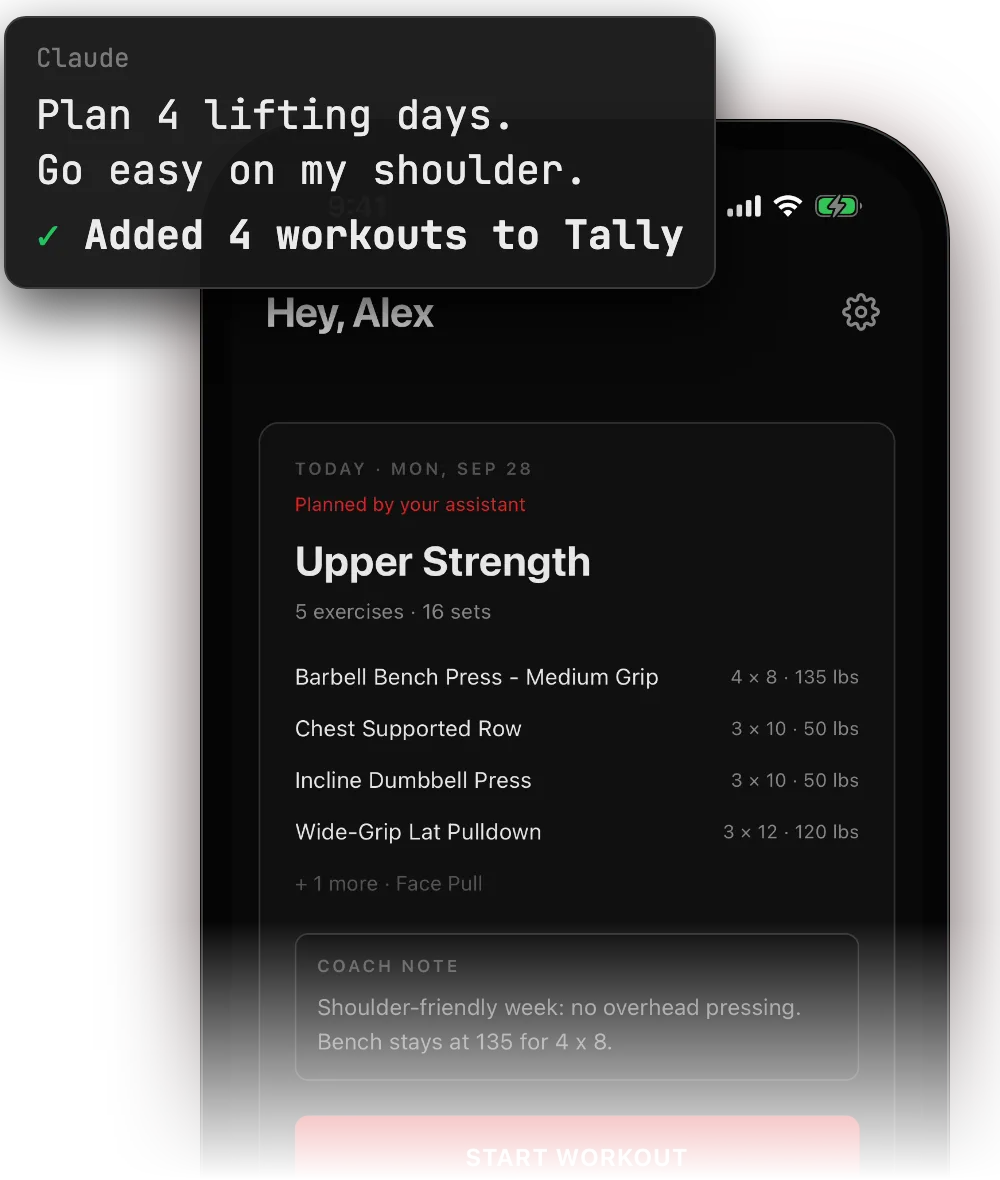
Each day shows in Tally as a planned workout, with its exercises, sets, reps and weights. Claude can add a short note to a day, for example why a weight stayed the same. It can also give you a link that opens the day in the app.
Step 3: Log your sets in Tally at the gym
At the gym, open Tally and start the day's workout. Log each set with the keypad. The rest timer starts when you log a set. Tally works without signal and syncs when your phone has signal again.
Change the weight, the reps or the exercise when you need to. Claude changes a finished workout only when you ask, and you can undo each change for 7 days. It also does not change a day that you edited in the app, unless you ask it to.
Step 4: Let Claude plan next week from your results
At the end of the week, ask Claude how the week went. Claude reads the workouts you logged, set by set, and sees any planned day that you missed or skipped. It uses your real numbers for the next plan.
How did my week go? Look at what I logged and the days I missed. Then plan next week and add it to Tally.To check a lift over a longer time, ask about progress. Claude can read up to a year of history for up to 10 exercises, with your top sets and your estimated one-rep max.
Show my bench press and squat progress for the last 3 months. Are they still going up?More prompts for Claude and Tally
Move a day
I cannot train on Thursday. Move Thursday's workout to Friday.Skip a day
I am sick today. Mark today's workout as skipped.Change an exercise
The leg press is always busy. On Saturday, change the leg press to hack squats with the same sets and reps.Short on time
I only have 40 minutes today. Make today's workout shorter, but keep the main lift.Deload week
I feel tired all the time. Make next week a deload: the same exercises at about 60% of the volume.Hotel gym
For the next 3 days I am at a hotel gym with a bench and dumbbells up to 50 lb. Change those days to fit.What Claude can see and change in Tally
- Claude sees only your Tally account, through the connector that you added.
- Claude can read your workouts, your plans and your progress.
- Claude can add, change, move, skip and delete planned days.
- Claude changes a finished workout only when you ask, and you can undo each change for 7 days.
- To disconnect, remove the connector in Claude, or sign out of Tally in the app.
Use a different AI agent with Tally
Tally works with any agent that supports MCP, not only Claude. See the steps for Claude Code, Codex, ChatGPT and other agents. To keep your training rules in files, read Use Claude Code as your strength coach.

More guides
- Use Claude Code as your strength coach
Keep your goals and rules in a CLAUDE.md file, connect Claude Code to Tally, and run a weekly check-in from the terminal.
- Hevy MCP vs Tally: connect an AI agent to your workout log
How the community Hevy MCP servers and Tally's own MCP server differ in cost, setup, platforms and what your agent can change.